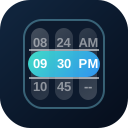
QTimeScroller renders hour and minute columns for compact time selection. Use it where a full time-picker popup would interrupt the flow, such as scheduling forms, dashboard filters, and mobile dialogs.
Basic
12 Hour
Use hour12 when the picker should display AM/PM values, and customize the labels when the default AM and PM text is too wide for the design.
Colors
Use palette names, CSS colors, or CSS custom properties to tune the shell, selected bar, and inner scroller area.
Disabled
Disable the full scroller or block specific hours and minutes.
Intervals
Reduce the visible choices by stepping hours or minutes, or hide an entire time segment.
QInput
Place the time scroller in a popup when the form should still show a compact input field.
Slots
Use the header and footer slots to add labels, helper text, or confirmation UI around the current timestamp.
Value Types
The scroller can accept common date/time shapes and emits the same shape back where possible.